
Provider quick start
This tutorial walks you through building your first service provider in Platform Mesh with api-syncagent. You will publish the HttpBin custom resource from a Kubernetes service cluster into kcp, then verify that a consumer workspace can create an HttpBin resource and receive status back.
No code provider
This provider is considered "no code", as all components are built and deployed. It is using generic UI of Platform-Mesh and api-syncagent, without any custom provider-specific code. You will deploy the HttpBin operator as a black box and use api-syncagent to publish its CRD into kcp and synchronize resources.
By the end of this tutorial, you will have:
- a provider workspace in kcp with an APIExport for the HttpBin API
- the HttpBin operator running on the service cluster
- api-syncagent synchronizing desired state and status between kcp and the service cluster
- a PublishedResource that tells api-syncagent which CRD to expose
- a consumer workspace that can bind the API and create an HttpBin resource
Development preview
The local setup is under active development. Commands and component versions may change.
Prerequisites
Before you begin, make sure you have:
- a local Platform Mesh setup without example data from Set up Platform Mesh locally
kubectlwith thekubectl-kcpandkubeloginplugins installed- Helm 3 installed
- basic familiarity with Kubernetes CRDs and operators
If you already ran the example-data setup, the HttpBin provider is deployed automatically. This tutorial is most useful from a clean setup where you build the provider flow yourself.
From the helm-charts/local-setup directory:
task local-setupWhat you will build
The HttpBin provider is a simple managed service provider. Consumers create HttpBin resources in their kcp workspace. api-syncagent synchronizes those resources into the service cluster, where the HttpBin operator reconciles them into running pods and writes status back.

The detailed synchronization flow looks like this:
The consumer never interacts with the service cluster directly. From their perspective, HttpBin is a Kubernetes resource type available in their workspace.
Set up kubeconfigs
In the local setup, one Kind cluster named platform-mesh hosts Platform Mesh and also acts as the service cluster for this tutorial. kcp runs inside that cluster, but exposes its own API server on https://localhost:8443.
You will use two kubeconfigs:
| Target | Kubeconfig | Purpose |
|---|---|---|
| kcp | .secret/kcp/admin.kubeconfig | Manage workspaces, APIExports, and APIBindings. |
| Kind cluster | default Kind kubeconfig | Manage operators, pods, CRDs, and api-syncagent. |
Run this from helm-charts/local-setup:
export PM_KUBECONFIG=$(pwd)/.secret/kcp/admin.kubeconfig

kind export kubeconfig --name platform-mesh
export COMPUTE_KUBECONFIG=$HOME/.kube/config
Verify both connections:
KUBECONFIG=$PM_KUBECONFIG kubectl kcp workspace use :root
kubectl --kubeconfig $COMPUTE_KUBECONFIG get nodes
Create the provider workspace
Provider workspaces are organized under root:providers. Create the container workspace and the HttpBin provider workspace:
Using the Provider resource
This tutorial creates the workspace directly using kcp admin credentials. Service providers who follow the normal onboarding path would instead create a Provider resource and let the controller provision the workspace and kubeconfig — see Bootstrap a provider.
KUBECONFIG=$PM_KUBECONFIG kubectl ws use :
KUBECONFIG=$PM_KUBECONFIG kubectl create-workspace providers --type=root:providers --enter --ignore-existing
KUBECONFIG=$PM_KUBECONFIG kubectl create-workspace httpbin-provider --type=root:provider --enter --ignore-existing
Expected output:
Current workspace is "root:providers:httpbin-provider" (type root:provider).Create the APIExport
The APIExport makes the service API visible to consumers. Create it in the provider workspace:
KUBECONFIG=$PM_KUBECONFIG kubectl apply -f - <<EOF
apiVersion: apis.kcp.io/v1alpha1
kind: APIExport
metadata:
  name: orchestrate.platform-mesh.io
  labels:
    ui.platform-mesh.io/content-for: orchestrate.platform-mesh.io
spec: {}
EOF
Grant bind permission so a consumer workspace can create an APIBinding to this export:
KUBECONFIG=$PM_KUBECONFIG kubectl apply -f - <<EOF
apiVersion: rbac.authorization.k8s.io/v1
kind: ClusterRole
metadata:
  name: apiexport-bind
rules:
  - apiGroups: ["apis.kcp.io"]
    resources: ["apiexports"]
    verbs: ["bind"]
---
apiVersion: rbac.authorization.k8s.io/v1
kind: ClusterRoleBinding
metadata:
  name: anonymous-view
subjects:
  - kind: User
    name: system:anonymous
    apiGroup: rbac.authorization.k8s.io
roleRef:
  kind: ClusterRole
  name: apiexport-bind
  apiGroup: rbac.authorization.k8s.io
EOF
Verify the APIExport:
KUBECONFIG=$PM_KUBECONFIG kubectl get apiexportsExpected output:
NAME                           AGE
orchestrate.platform-mesh.io   5s
Deploy the HttpBin operator
The HttpBin operator runs on the service cluster. api-syncagent handles the integration with kcp, so the operator itself does not need to know about Platform Mesh.
Create the following values.yaml file:
operator:
  args:
    - --local-http-route
    - --local-http-route-port=8443
    - --local-http-route-gateway-name=k8sapi-gateway
    - --local-http-route-gateway-namespace=platform-mesh-system
    - --domain=httpbin.services.portal.localhost
Run this from the helm-charts repository root:
cd ..

helm upgrade --install example-httpbin-operator \
  ./charts/example-httpbin-operator \
  --kubeconfig $COMPUTE_KUBECONFIG \
  -n example-httpbin-provider \
  --create-namespace \
  -f ./values.yaml
Verify the operator:
KUBECONFIG=$COMPUTE_KUBECONFIG kubectl get pods -n example-httpbin-providerVerify the CRD:
KUBECONFIG=$COMPUTE_KUBECONFIG kubectl get crd httpbins.orchestrate.platform-mesh.ioThe CRD defines an HttpBin resource with a spec.region field and a status subresource:
apiVersion: orchestrate.platform-mesh.io/v1alpha1
kind: HttpBin
metadata:
  name: my-httpbin
spec:
  region: eu-west-1
status:
  ready: false
  url: ""
  conditions: []
The status subresource matters because api-syncagent uses it to synchronize provider status back to kcp.
Deploy api-syncagent
api-syncagent runs on the service cluster and connects to kcp. It needs a kubeconfig Secret for kcp access.
Create the Secret:
KUBECONFIG=$COMPUTE_KUBECONFIG kubectl create secret generic httpbin-kubeconfig \
  -n example-httpbin-provider \
  --from-file=kubeconfig=$PM_KUBECONFIG
In the local setup, kcp is exposed through Traefik on localhost:8443 at the pinned ClusterIP 10.96.188.4. Pods need host aliases so in-cluster traffic can resolve the kcp hostnames to that address. These values match the hostAliases block in the canonical example-httpbin-provider HelmRelease in the local-setup.
Install api-syncagent:
helm repo add kcp https://kcp-dev.github.io/helm-charts
helm repo update

helm upgrade --install api-syncagent kcp/api-syncagent \
  --kubeconfig $COMPUTE_KUBECONFIG \
  -n example-httpbin-provider \
  --set apiExportEndpointSliceName=orchestrate.platform-mesh.io \
  --set agentName=kcp-api-syncagent \
  --set kcpKubeconfig=httpbin-kubeconfig \
  --set hostAliases.enabled=true \
  --set "hostAliases.values[0].ip=10.96.188.4" \
  --set "hostAliases.values[0].hostnames[0]=localhost" \
  --set "hostAliases.values[0].hostnames[1]=portal.localhost" \
  --set "hostAliases.values[0].hostnames[2]=kcp.localhost" \
  --set "hostAliases.values[0].hostnames[3]=root.kcp.localhost"
Grant RBAC for api-syncagent on the service cluster:
KUBECONFIG=$COMPUTE_KUBECONFIG kubectl apply -f - <<EOF
apiVersion: rbac.authorization.k8s.io/v1
kind: ClusterRole
metadata:
  name: api-syncagent-httpbin
rules:
  - apiGroups: ["orchestrate.platform-mesh.io"]
    resources: ["httpbins", "httpbins/status"]
    verbs: ["*"]
  - apiGroups: [""]
    resources: ["namespaces"]
    verbs: ["*"]
---
apiVersion: rbac.authorization.k8s.io/v1
kind: ClusterRoleBinding
metadata:
  name: api-syncagent-httpbin
subjects:
  - kind: ServiceAccount
    name: api-syncagent
    namespace: example-httpbin-provider
roleRef:
  kind: ClusterRole
  name: api-syncagent-httpbin
  apiGroup: rbac.authorization.k8s.io
EOF
Verify api-syncagent:
KUBECONFIG=$COMPUTE_KUBECONFIG kubectl get pods -n example-httpbin-provider -l app.kubernetes.io/name=kcp-api-syncagentCreate a PublishedResource
PublishedResource tells api-syncagent which CRD to publish into kcp. Create it on the service cluster:
KUBECONFIG=$COMPUTE_KUBECONFIG kubectl apply -f - <<EOF
apiVersion: syncagent.kcp.io/v1alpha1
kind: PublishedResource
metadata:
  name: httpbin-local-provider
spec:
  resource:
    kind: HttpBin
    apiGroup: orchestrate.platform-mesh.io
    version: v1alpha1
EOF
api-syncagent will create an APIResourceSchema in kcp and update the APIExport.
Verify the schema:
KUBECONFIG=$PM_KUBECONFIG kubectl kcp workspace use :root:providers:httpbin-provider
KUBECONFIG=$PM_KUBECONFIG kubectl get apiresourceschemas
Verify the APIExport references the schema:
KUBECONFIG=$PM_KUBECONFIG kubectl get apiexport orchestrate.platform-mesh.io -o yamlLook for the published schemas in the spec block.
Check the agent logs:
KUBECONFIG=$COMPUTE_KUBECONFIG kubectl logs -n example-httpbin-provider -l app.kubernetes.io/name=kcp-api-syncagent --tail=20Test the consumer flow
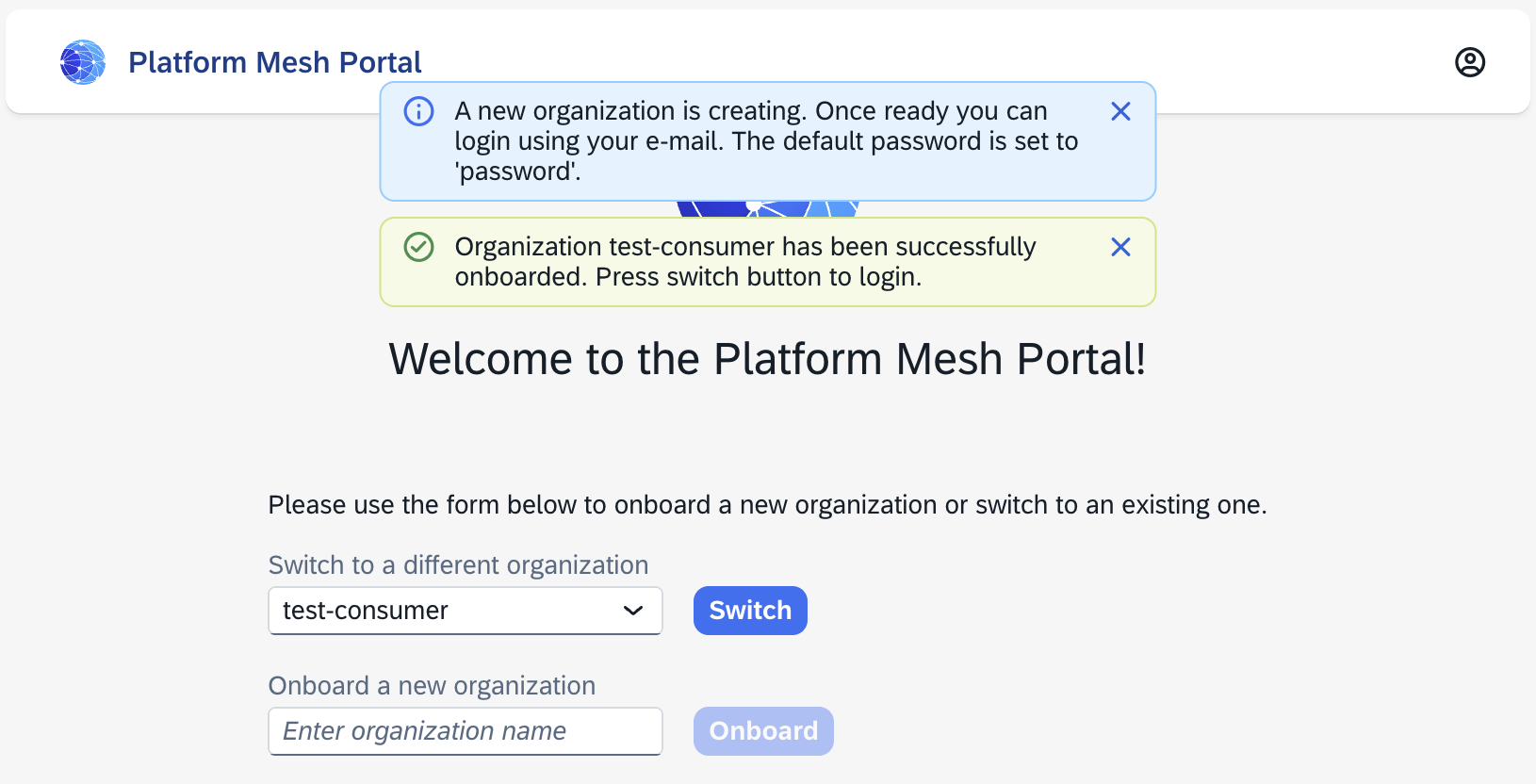
Login into https://portal.localhost:8443 and create organization test-consumer:
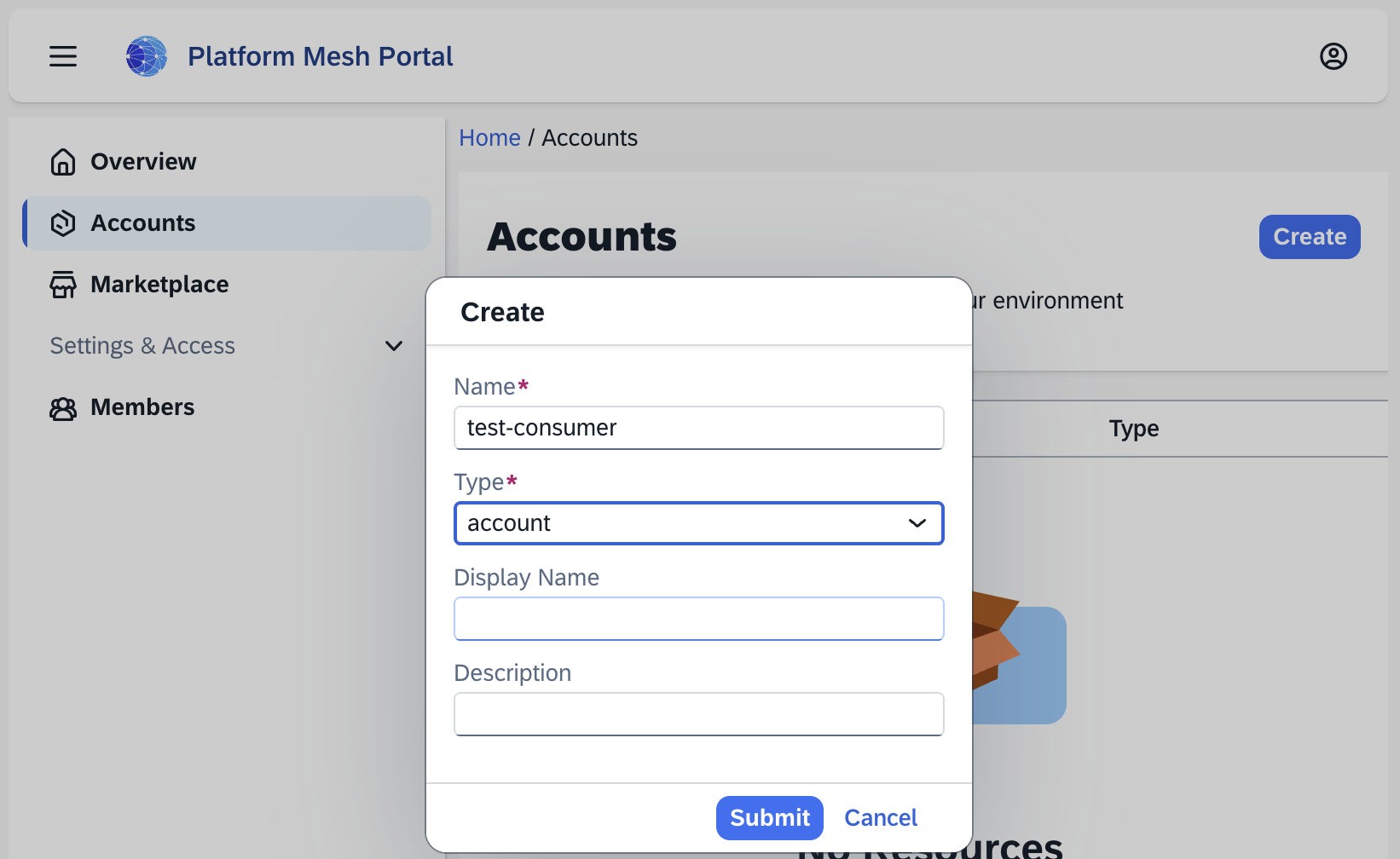
Create an account under the organization.
Wait until the account is ready, then download the kubeconfig and set the environment variable:
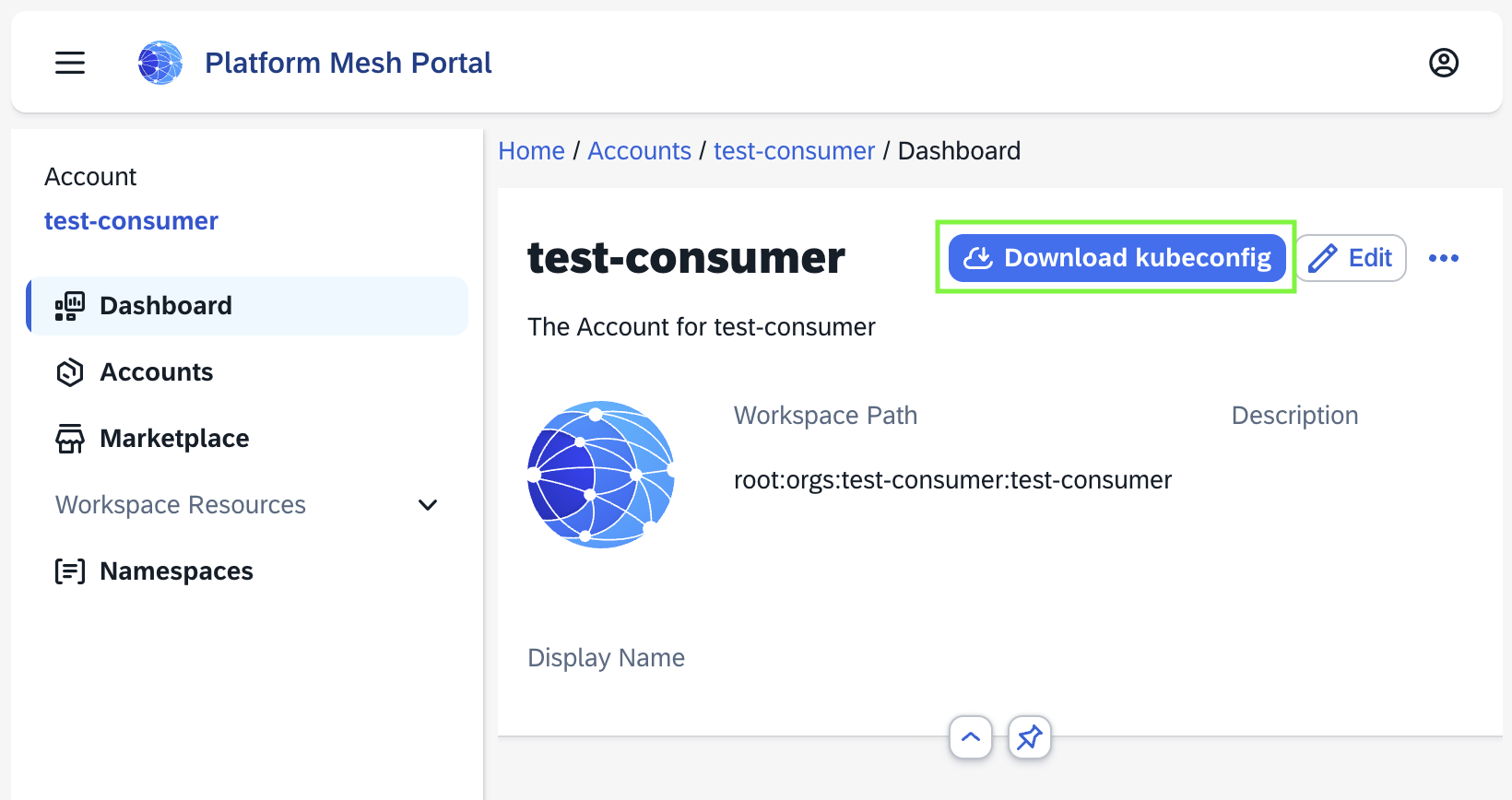
export CONSUMER_KUBECONFIG=/path/to/consumer-kubeconfigCreate an APIBinding:
KUBECONFIG=$CONSUMER_KUBECONFIG kubectl apply -f - <<EOF
apiVersion: apis.kcp.io/v1alpha1
kind: APIBinding
metadata:
  name: orchestrate.platform-mesh.io
spec:
  reference:
    export:
      name: orchestrate.platform-mesh.io
      path: "root:providers:httpbin-provider"
  permissionClaims:
  - resource: namespaces
    state: Accepted
    all: true
  - resource: events
    state: Accepted
    all: true
EOF
Verify the binding:
KUBECONFIG=$CONSUMER_KUBECONFIG kubectl get apibindingsVerify the API is available:
KUBECONFIG=$CONSUMER_KUBECONFIG kubectl api-resources | grep httpbinCreate an HttpBin instance:
KUBECONFIG=$CONSUMER_KUBECONFIG kubectl apply -f - <<EOF
apiVersion: orchestrate.platform-mesh.io/v1alpha1
kind: HttpBin
metadata:
  name: my-httpbin
  namespace: default
spec:
  region: eu-west-1
EOF
Check the service cluster for the synchronized resource:
KUBECONFIG=$COMPUTE_KUBECONFIG kubectl get httpbins --all-namespaces
KUBECONFIG=$COMPUTE_KUBECONFIG kubectl get pods --all-namespaces | grep httpbin
Check status back in kcp:
KUBECONFIG=$CONSUMER_KUBECONFIG kubectl get httpbin my-httpbin -n default -o yamlLook for a populated status section with readiness and URL information. If status is still empty, wait a few seconds and check the operator and api-syncagent logs.
Review the data flow
The HttpBin operator did not need Platform Mesh-specific code. api-syncagent handled the integration path by publishing the CRD to kcp and synchronizing resources between the consumer workspace and the service cluster.
Marketplace
So far the HttpBin API works end-to-end on the command line, but the Platform Mesh portal still has no idea it exists. To make the provider discoverable in the Marketplace and to add a navigation entry for the resource in the UI, you create two resources in the provider workspace:
| Resource | Purpose |
|---|---|
ProviderMetadata | Registers your provider with the Marketplace — display name, description, contacts, icons. |
ContentConfiguration | Adds Luigi navigation nodes and views to the portal for your APIExport. |
Both resources live in the provider workspace alongside the APIExport:
KUBECONFIG=$PM_KUBECONFIG kubectl kcp workspace use :root:providers:httpbin-providerRegister the provider
Apply a ProviderMetadata whose name matches the APIExport name. The Marketplace virtual workspace joins these two on name to build a MarketplaceEntry.
KUBECONFIG=$PM_KUBECONFIG kubectl apply -f - <<EOF
apiVersion: ui.platform-mesh.io/v1alpha1
kind: ProviderMetadata
metadata:
  name: orchestrate.platform-mesh.io
spec:
  displayName: HttpBin Provider
  description: |
    Example provider for the Platform Mesh quickstart.
    Provisions HttpBin instances on a service cluster.
  contacts:
    - displayName: HttpBin Team
      email: httpbin@platform-mesh.io
      role: ["Maintainer"]
  preferredSupportChannels:
    - displayName: HttpBin Support
      url: https://github.com/platform-mesh/platform-mesh.github.io
  icon:
    light:
      data: "data:image/svg+xml;base64,PHN2ZyB4bWxucz0iaHR0cDovL3d3dy53My5vcmcvMjAwMC9zdmciIHZpZXdCb3g9IjAgMCAyMDAgMjAwIj4KICA8Y2lyY2xlIGN4PSIxMDAiIGN5PSIxMDAiIHI9IjkwIiBmaWxsPSIjMmM3YmU1IiAvPgogIDx0ZXh0IHg9IjEwMCIgeT0iMTE1IiBmb250LWZhbWlseT0iQXJpYWwsIHNhbnMtc2VyaWYiIGZvbnQtc2l6ZT0iNDAiIGZvbnQtd2VpZ2h0PSJib2xkIiB0ZXh0LWFuY2hvcj0ibWlkZGxlIiBmaWxsPSIjZmZmIj5IVFRQPC90ZXh0Pgo8L3N2Zz4K"
    dark:
      data: "data:image/svg+xml;base64,PHN2ZyB4bWxucz0iaHR0cDovL3d3dy53My5vcmcvMjAwMC9zdmciIHZpZXdCb3g9IjAgMCAyMDAgMjAwIj4KICA8Y2lyY2xlIGN4PSIxMDAiIGN5PSIxMDAiIHI9IjkwIiBmaWxsPSIjMmM3YmU1IiAvPgogIDx0ZXh0IHg9IjEwMCIgeT0iMTE1IiBmb250LWZhbWlseT0iQXJpYWwsIHNhbnMtc2VyaWYiIGZvbnQtc2l6ZT0iNDAiIGZvbnQtd2VpZ2h0PSJib2xkIiB0ZXh0LWFuY2hvcj0ibWlkZGxlIiBmaWxsPSIjZmZmIj5IVFRQPC90ZXh0Pgo8L3N2Zz4K"
EOF
Matching names
The metadata.name of the ProviderMetadata must match the APIExport name (orchestrate.platform-mesh.io). The Marketplace builds entries by joining the two.
Add a UI navigation entry
ContentConfiguration carries a Luigi config fragment that the portal merges into its navigation tree. The ui.platform-mesh.io/content-for label links the configuration to your APIExport — without it, the portal will not load this fragment when the consumer binds the API.
KUBECONFIG=$PM_KUBECONFIG kubectl apply -f - <<EOF
apiVersion: ui.platform-mesh.io/v1alpha1
kind: ContentConfiguration
metadata:
  labels:
    ui.platform-mesh.io/entity: core_platform-mesh_io_account
    ui.platform-mesh.io/content-for: orchestrate.platform-mesh.io
  name: httpbin-ui
spec:
  inlineConfiguration:
    content: |-
      {
          "name": "httpbins",
          "creationTimestamp": "2022-05-17T11:37:17Z",
          "luigiConfigFragment": {
              "data": {
                  "nodes": [
                      {
                          "pathSegment": "orchestrate_platform-mesh_io_httpbins",
                          "navigationContext": "orchestrate_platform-mesh_io_httpbins",
                          "label": "Http Bins",
                          "icon": "paint-bucket",
                          "order": 800,
                          "entityType": "main.core_platform-mesh_io_account",
                          "loadingIndicator": {
                              "enabled": false
                          },
                          "keepSelectedForChildren": true,
                          "url": "/assets/platform-mesh-portal-ui-wc.js#generic-list-view",
                          "webcomponent": {
                              "selfRegistered": true
                          },
                          "context": {
                              "resourceDefinition": {
                                  "apiGroup": "orchestrate_platform_mesh_io",
                                  "entityCollection": "HttpBins",
                                  "version": "v1alpha1",
                                  "entity": "HttpBin",
                                  "scope": "Namespaced",
                                  "namespace": null,
                                  "readyCondition": {
                                    "jsonPathExpression": "status.ready",
                                    "property": ["status.ready"]
                                  },
                                  "ui": {
                                      "logoUrl": "https://www.kcp.io/icons/logo.svg",
                                      "listView": {
                                          "fields": [
                                              {
                                                  "label": "Name",
                                                  "property": "metadata.name"
                                              },
                                              {
                                                  "label": "Ready",
                                                  "property": "status.ready",
                                                  "uiSettings": {
                                                    "displayAs": "boolIcon"
                                                  }
                                              },
                                              {
                                                  "label": "Link",
                                                  "property": "status.url",
                                                  "uiSettings": {
                                                    "displayAs": "link"
                                                  }
                                              }
                                          ]
                                      },
                                      "detailView": {
                                        "fields": [
                                          {
                                            "label": "Name",
                                            "property": "metadata.name"
                                          }
                                        ]
                                      },
                                      "createView": {
                                          "fields": [
                                              {
                                                  "label": "Name",
                                                  "property": "metadata.name",
                                                  "required": true
                                              }
                                          ]
                                      }
                                  }
                              }
                          },
                          "children": [
                            {
                                "pathSegment": ":httpbinId",
                                "hideFromNav": true,
                                "keepSelectedForChildren": false,
                                "defineEntity": {
                                    "id": "orchestrate_platform-mesh_io_httpbin",
                                    "contextKey": "httpbinId",
                                    "graphqlEntity": {
                                        "group": "orchestrate_platform-mesh_io",
                                        "version": "v1alpha1",
                                        "kind": "HttpBin",
                                        "query": "{ metadata { name } }"
                                    }
                                },
                                "context": {
                                    "accountId": ":accountId",
                                    "httpbinId": ":httpbinId",
                                    "resourceId": ":httpbinId"
                                }
                            }
                          ]
                      },
                      {
                        "entityType": "main.core_platform-mesh_io_account.orchestrate_platform-mesh_io_httpbin",
                        "pathSegment": "dashboard",
                        "label": "Dashboard",
                        "url": "/assets/platform-mesh-portal-ui-wc.js#generic-detail-view",
                        "webcomponent": {
                          "selfRegistered": true
                        },
                        "defineEntity": {
                            "id": "dashboard"
                        },
                        "compound": {
                            "children": []
                        }
                      }
                  ]
              }
          }
      }
    contentType: json
EOF
See it in the portal
Open the portal at https://portal.localhost:8443 as the consumer account you created earlier. Under Marketplace, the HttpBin Provider tile should now appear. Clicking Install creates an APIBinding in the consumer workspace — equivalent to the manifest you applied by hand in the Test the consumer flow step. After installation, a HttpBins entry appears in the left navigation, listing the resources you created.
Next
Continue with Consume a service from a controller to build the consumer side of the loop you just opened.
Optional branches:
- api-syncagent for the architecture behind what you just built.
- Build a multicluster-runtime provider for the advanced provider track.
- Service provider persona for the role context.