Getting Started
This guide will help you set up a local Platform Mesh environment using a Kind (Kubernetes in Docker) cluster. By the end of this guide, you'll have a fully functional Platform Mesh installation running on your local machine.
Overview
The local setup creates a complete Platform Mesh environment including:
- Kind cluster running Kubernetes v1.35.0
- Core infrastructure: Flux, Cert-Manager, OCM controller
- Platform Mesh operator and all required components
- Local SSL certificates for secure communication
- Onboarding Portal for managing organizations and services
The local setup scripts and configuration are located in the platform-mesh/helm-charts repository, local-setup directory.
Prerequisites
Before you begin, ensure you have the following tools installed:
System Requirements
- Minimum: 8 GB RAM, 6 CPUs
- Ensure your Docker/Podman has sufficient resources allocated
Required Tools
- Docker or Podman - Container runtime
- Docker Desktop is recommended for WSL2 users
- Ensure the container daemon is running before starting setup
- Kind - Kubernetes in Docker (Installation)
- kubectl - Kubernetes command-line tool (usually installed with Docker Desktop or Kind)
- Helm - Kubernetes package manager (Installation)
- openssl - Required for SSL certificate generation (typically pre-installed on Linux/macOS)
- base64 - Required for encoding/decoding operations (standard Unix utility, typically pre-installed)
- mkcert - Local certificate generation tool (Installation)
- kubectl-kcp plugin - Required only for
--example-datasetup (Installation) - yq - Required by local-setup scripts
Optional Tools
- Task - Task runner for executing project tasks (Installation)
- Provides convenient command aliases (e.g.,
task local-setup) - Not required - you can run scripts directly
- When using Task, mkcert can be automatically installed to a local
bindirectory if you have Go installed
- Provides convenient command aliases (e.g.,
Platform-Specific Notes
WSL2 Users
WSL version 2.1.5 or higher is required with Docker Desktop WSL2 integration enabled. You'll need to set up mkcert to work across both WSL2 and Windows. See the WSL2 setup guide for detailed instructions.
macOS Podman Users
Set the environment variable: KIND_EXPERIMENTAL_PROVIDER=podman
For detailed installation instructions for each prerequisite, refer to the helm-charts local-setup README.
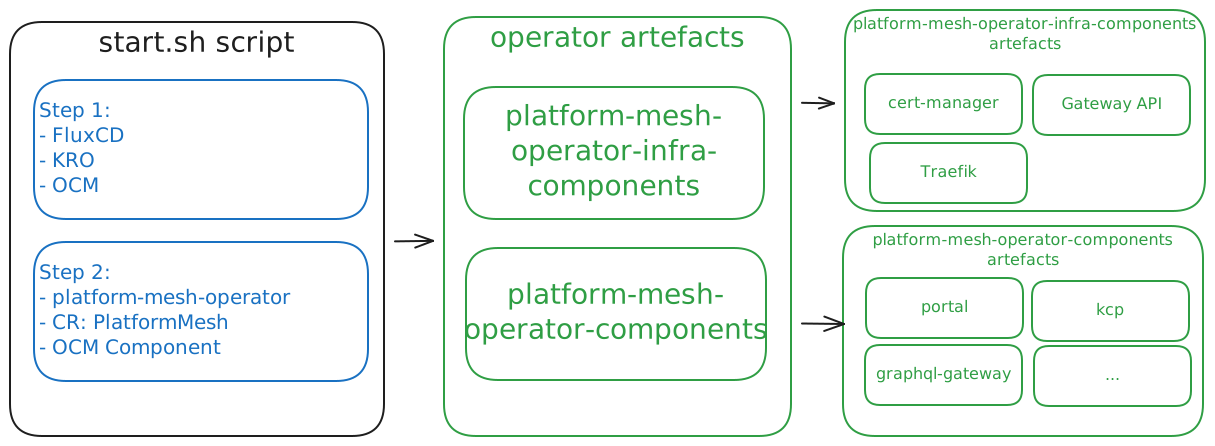
Bootstrap process
Additional Resources
- Full Local Setup Documentation - Comprehensive guide with all details
- Platform Mesh Helm Charts - Source repository
- Platform Mesh Operator - Operator documentation and API reference
- Overview - Learn about Platform Mesh architecture
- Scenarios - Explore usage scenarios
Getting Help
If you encounter issues not covered in this guide, we are here to help: Open an issue in the helm-charts repository